
I am playing around with the Row Model right now and tried to build a multi-layered P&L. I really appreciate that you can reference items at the same level in a formula, it has always been a pet peeve of mine that you had to do so many hierarchy levels in Power BI to get a full P&L and then it would look terrible.
The Row Model builder in the Planning sheet is quite the step up in UX. However, it is customary to read a P&L from top to bottom, so I was happy to be able to change the Row Subtotals to "Bottom" - and then something weird happened.
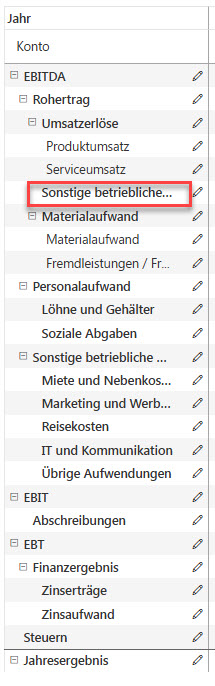
This is what the first levels should look like:
Rohertag
- Umsatzerlöse
-- Produktumsatz
-- Serviceumsatz
- Sonstige betriebliche Erlöse
- Materialaufwand
-- Materialaufwand
-- Fremdleistungen / Fracht
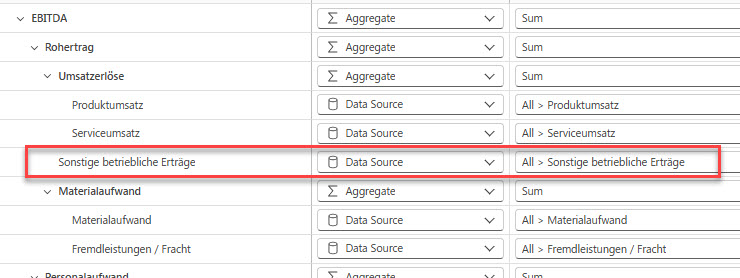
So Rohertrag has 3 children. Only 2 of those children have children themselves.
When I keep the total at the top it looks correct:
This is a screenshot from the Row Model Builder:
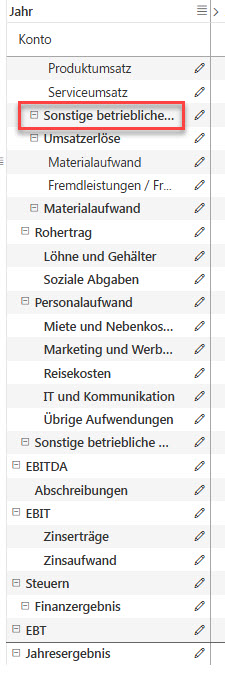
Now I changed Row Subtotal to "Bottom" (Row Grand Total is "Bottom" in all of those screenshots without an issue)
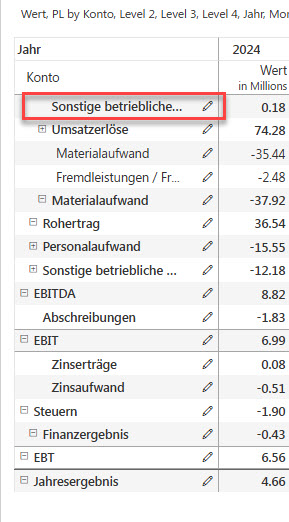
Suddenly "Sonstige betriebliche Erträge" (the level without any children) moved between "Umsatzerlöse" and its children "Produktumsatz" and "Serviceumsatz". If I click the [-] in front of "Sonstige betriebliche Erträge", nothing happens (it shouldn't even have one), if I click the [-] in front of "Umsatzerlöse" it collapses correctly, the two children disappear - it stays below "Sonstige betriebliche Erträge" though even though it should be above:
5 Replies

Viewing 5 replies - 1 through 5 (of 5 total)
Join the conversation
You must be logged in to reply to this topic.

