
Hi all,
Sharing a problem and a workaround in Fabric Plan (preview), in case it saves someone a few hours. I'd also like to know if there is a proper way to do this.
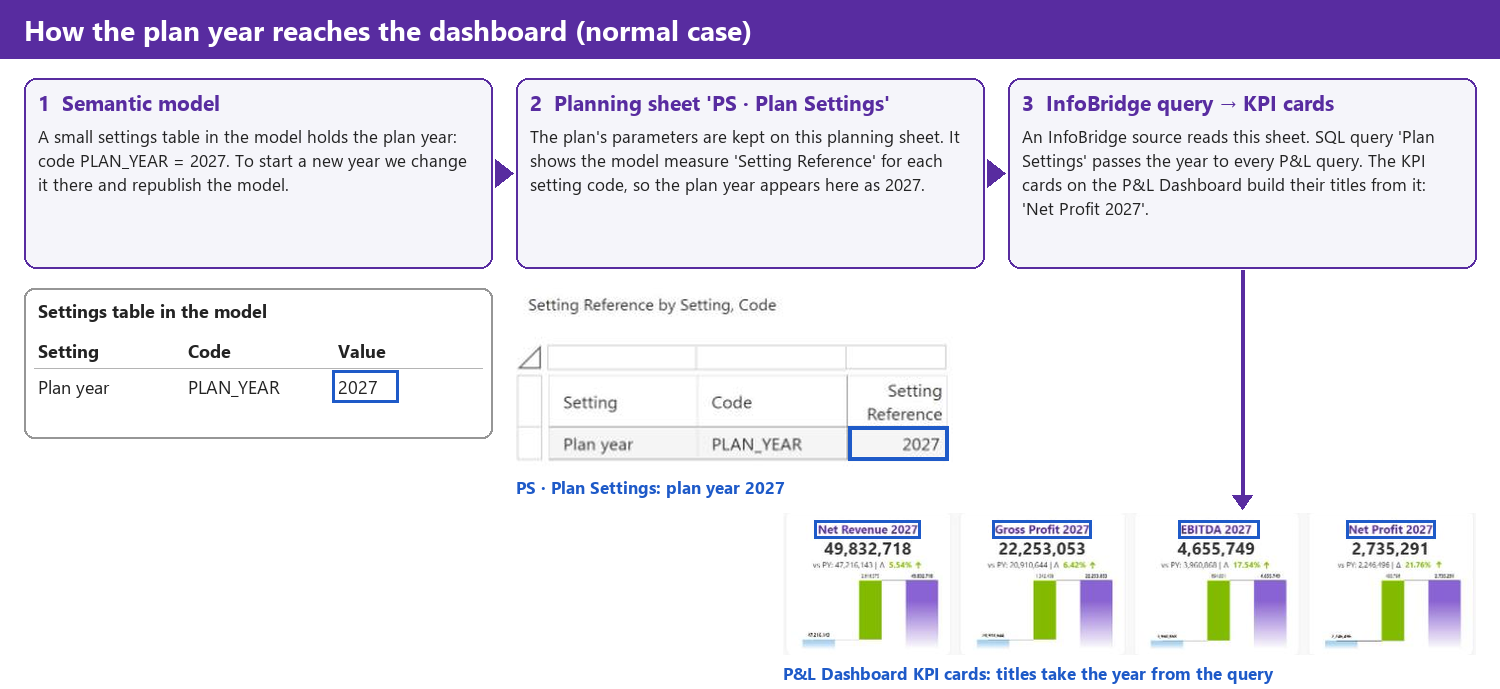
How our plan gets its plan year. We don't type the year into queries or cards. It flows through four steps:
- Semantic model. A small settings table holds the plan's parameters, for example code PLAN_YEAR = 2027. To start a new budget year, we change the value there and republish the model.
- Planning sheet "PS · Plan Settings". This sheet keeps the plan's parameters in one place. It shows one row per setting code, with a model measure ("Setting Reference") as the value. So the sheet shows Plan year = 2027.
- InfoBridge query. An InfoBridge source reads that planning sheet. A SQL query ("Plan Settings") on it passes the year to every P&L query in the plan.
- Dashboard. The KPI cards and charts on the P&L Dashboard use those queries, so their titles read "Net Revenue 2027", "Net Profit 2027", and so on.
What happened. I republished the model with a new plan year. After Data refresh, the planning sheet PS · Plan Settings showed the new year. But the query on that sheet kept returning the old year, and so did every KPI card and chart built on it. A DAX query on the dataset also returned the new year, so the model was fine.
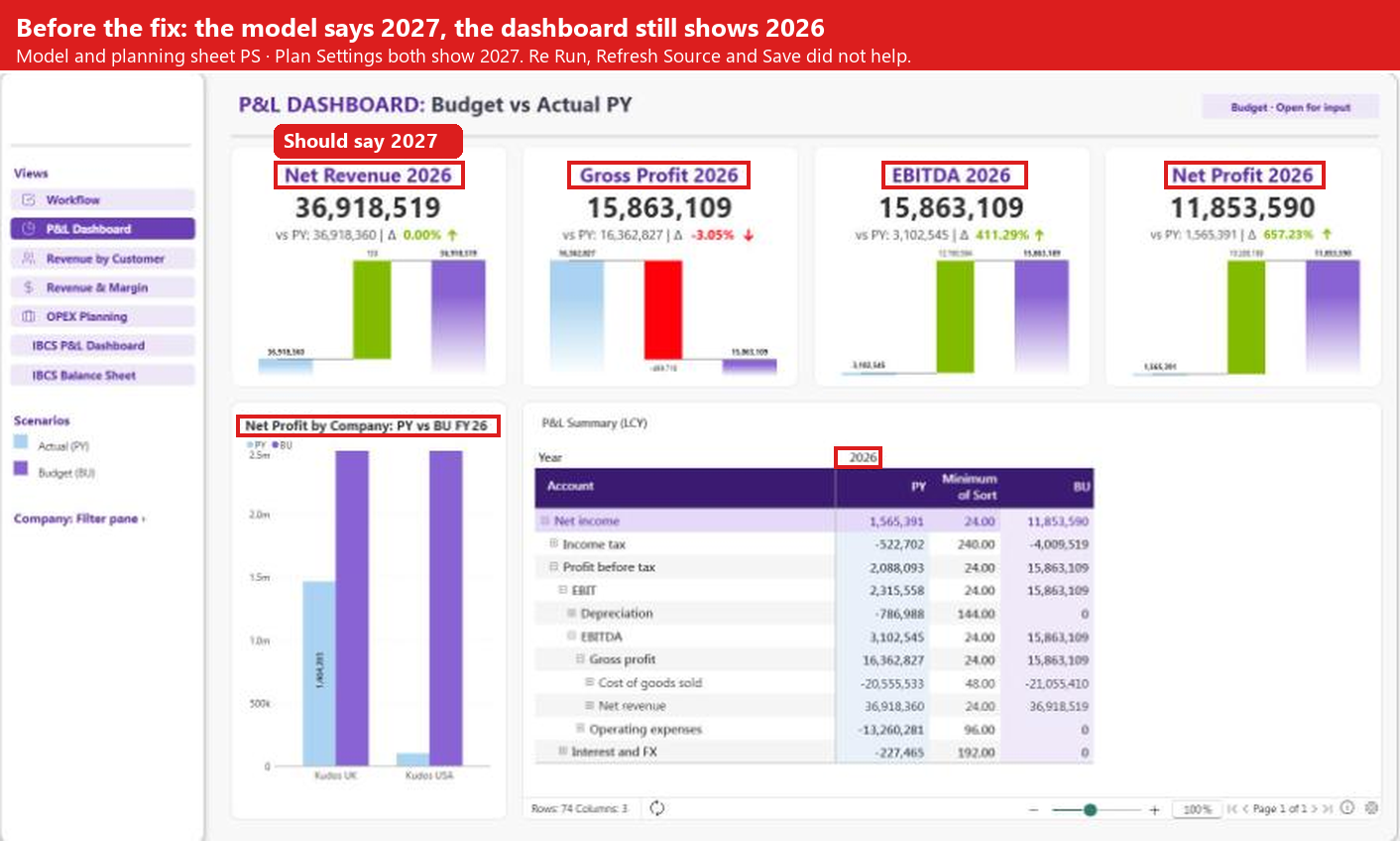
What did not help:
- Re Run on the query
- Query editor › Source › Refresh
- Manage Source › Refresh Source (Refresh History says Success)
- Data pane refresh and the Sync button on the sheet
- Save after the refresh
- Waiting: more than 3 hours, no change
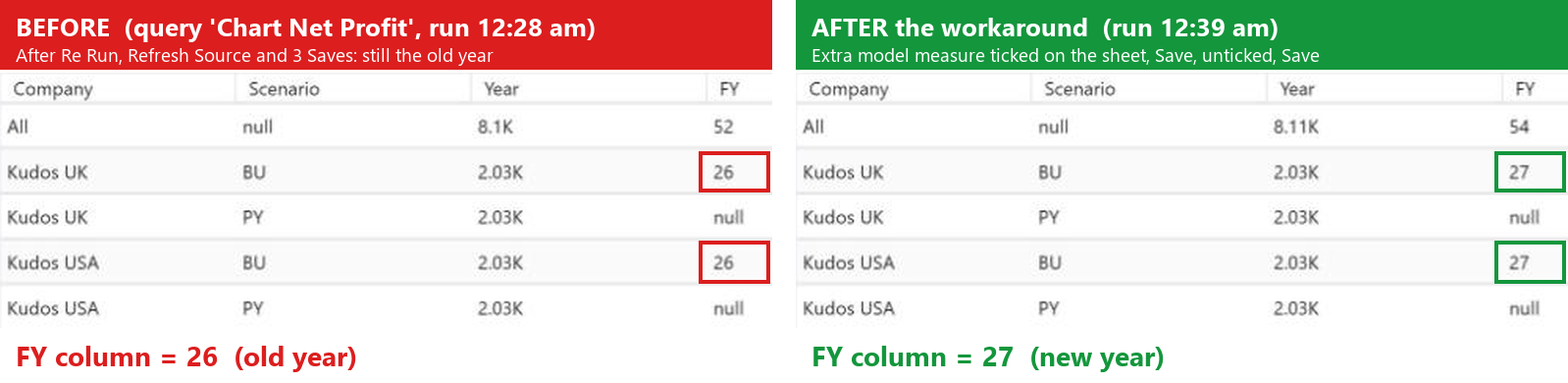
What we found. When a query runs, it does not ask the model for the value. It reads a stored copy of the sheet's model (native) measure values. A Save of the sheet rewrites that copy, but only with cells that changed on screen during that session. In our case the sheet already showed the new year when I opened it. So the refresh changed nothing on screen, and the next Saves kept the old value in the copy. Re Run and Refresh Source read the same copy, so they can't help either.
Workaround that worked. Make the sheet's set of model measures change for a moment. That forces the plan to rebuild the stored copy from the model.
- Open PS · Plan Settings in Editing mode and click Data refresh.
- In the Fields pane, tick one more model measure into Values, so a second value column appears on the sheet. Any existing measure from the same model works; we used "Plan Assumption Count". Save.
- Wait about a minute. The plan rebuilds the stored copy and re-runs the queries by itself. The query now returns the new year.
- Untick the extra measure and Save again. The sheet looks as before, and the new year stays.
Tip: pick a measure that has a value for the same rows as the sheet. A measure that is filled for many more rows can leave extra rows in the stored copy.
Questions:
- Is there a supported way to rebuild a planning sheet's stored model values from the semantic model, without changing the sheet?
- Should Refresh Source re-read the model instead of the stored copy?
- What is the intended step after a semantic model refresh or republish, so that InfoBridge queries on planning sheets see the new values? This matters every month, when new actuals arrive, not only once a year.
Happy to share more details.
Thanks!
2 Replies

Viewing 2 replies - 1 through 2 (of 2 total)
Join the conversation
You must be logged in to reply to this topic.

