
Deva
Our Approach to Workforce Planning
Enterprise PlanningWorkforcePlanningHeadcountPlanningCompensationModelingSkillModeling
Anyone who has run an annual planning cycle knows the standoff. Leadership looks at the market and hands down a top-down revenue target of 15% growth. Meanwhile, the department leads build their budgets from the bottom up based on actual headcount, pipeline, and capacity, and usually land somewhere around 8%.
Finance then spends the next three weeks living in spreadsheets, trying to negotiate the gap between those two numbers.
When you manage this in Excel, top-down and bottom-up planning usually live in completely different workbooks. You have a high-level target sheet for the executives, a granular operational sheet for the managers, and a variance tab trying to tie them together.
When you build your plan directly on top of your semantic model, you don't need separate workbooks for different planning motions. Because the grid understands your dimension hierarchies natively, it can handle both directions at the same time.
The trick with top-down adjustments is how you distribute the numbers down the hierarchy. Fabric Planning handles this through three distribution modes:
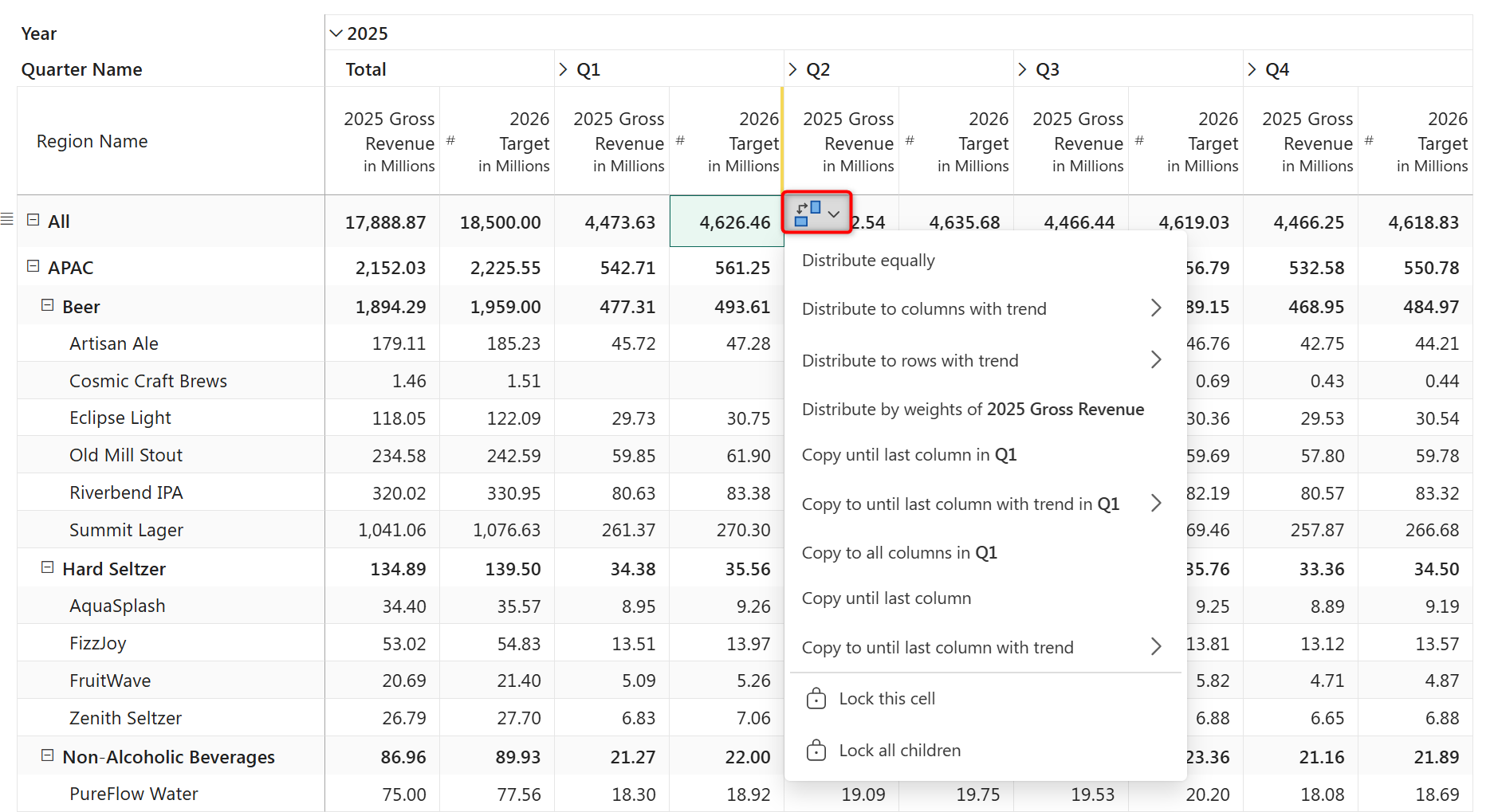
This dual-directional planning is a core capability of the platform, and it doesn't require writing complex DAX allocation formulas to set up. If you want to see how this works in practice, jump into Exercise E1 in the Fabric Planning training guide. It walks you step-by-step through configuring target spreading and aggregation on a real dataset.
Yes, because the planning grid understands your dimension hierarchy natively, a regional manager can enter values at the store or product level while leadership adjusts totals from the top. Both inputs coexist on the same sheet—bottom-up entries aggregate up automatically, and top-down adjustments distribute down based on the distribution mode you choose.
The most recent edit is retained. If leadership overwrites a regional total after a manager has already entered granular values, the distribution mode you select determines how the new total is pushed back down, potentially overwriting the manager's inputs. For this reason, many teams use locking to protect confirmed bottom-up entries before running a top-down adjustment.
Yes, Fabric Planning lets you lock individual cells or entire subtrees before triggering a distribution. Locked cells are skipped during spreading, so the adjustment distributes only across unlocked descendants.
No, distribution modes are handled directly within the visual interface. Equal, Weights, and Trend are available directly when you adjust a parent-level cell or select the distribution action. No custom DAX allocation logic is required.
Yes. You can enter an annual or quarterly top-down target across a time column and distribute it horizontally across months, either using equal monthly splits, a linear trend, or by applying the Weights mode against prior-year monthly actuals to preserve historical seasonality.


Comments
0Please log in to comment.