Fabric Planning: auto-populate monthly weight from a Single Select phasing type

Started by vdmt · 1 month, 2 weeks ago · 5 replies · 193 views
vdmt Participant
1 month, 2 weeks ago

We are implementing annual-to-month phasing in a Microsoft Fabric planning sheet. A semantic-model reference table (REF_PHASING_TYPE) contains phasing types (for example, Evenly, Quarterly, and Bi-monthly) and their weight for each month.

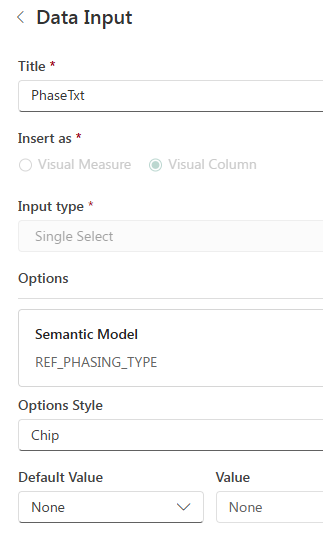
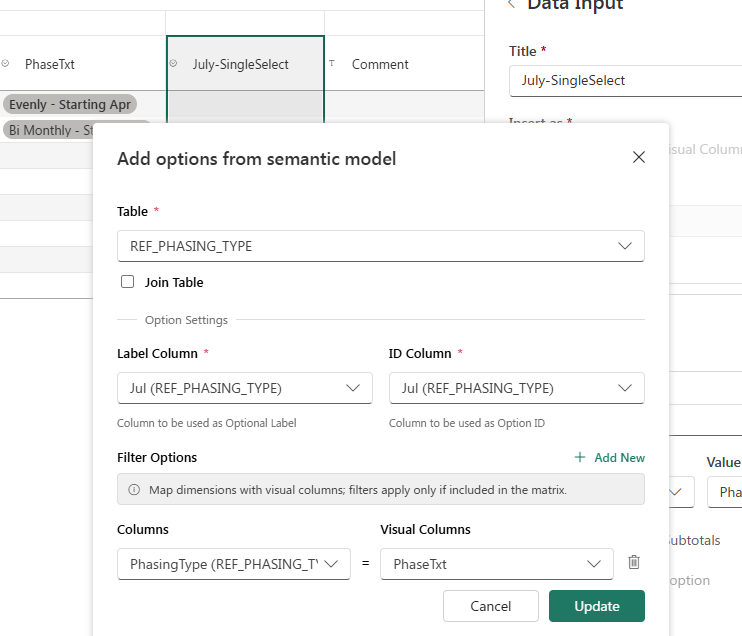
PhaseTxt is configured as a Single Select input sourced from REF_PHASING_TYPE. We need each monthly weight column (for example, July) to be derived automatically from the row's selected PhaseTxt value so it can be used in a subsequent calculation against the annual amount.

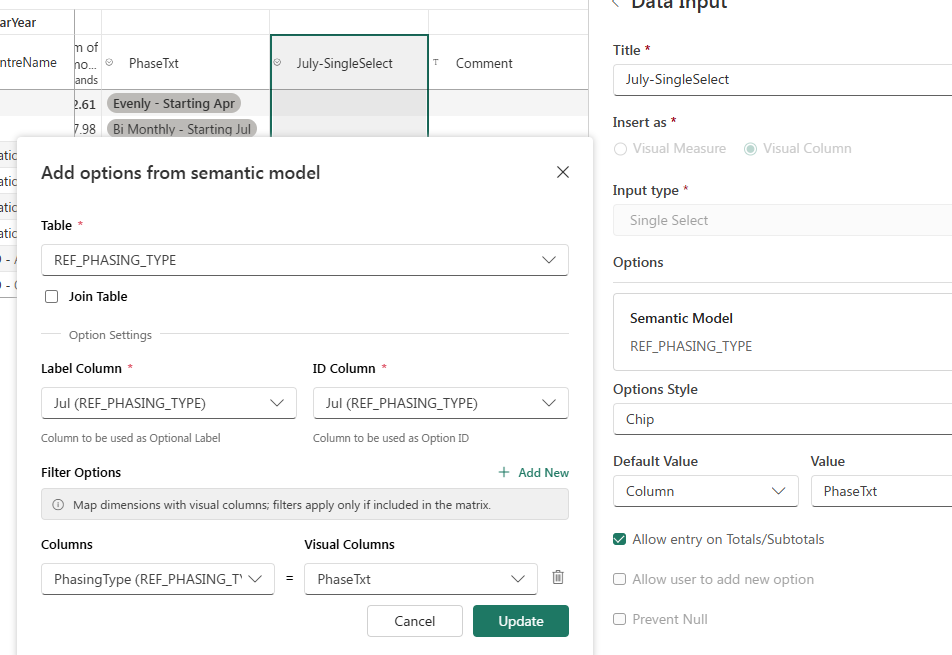
We attempted to configure July-SingleSelect as another Single Select lookup to the reference table. However, after selecting PhaseTxt, the July value is not automatically populated; it still requires a separate user selection.

Question: In Fabric Planning, can a column automatically return the corresponding value from a semantic-model reference table based on another Single Select column in the same row? If so, should this be implemented using an On Change Formula, a calculated/formula column, or another supported lookup pattern rather than a second Single Select input?

This is the plan sheet:
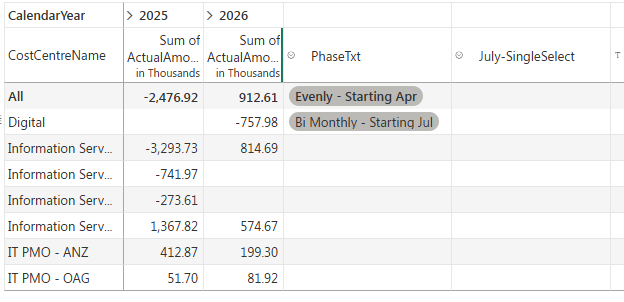
PhaseTxt input field:
July-SingleSelect field type:
Our Phase table looks like:
5 Replies
Senior Product Specialist · Lumel Technologies · 1 month, 1 week ago

Hi,

Auto-populating monthly weight columns based on a selected phasing type is achievable using PowerTable, and the approach you've outlined is the right foundation.

However, the specific method you've tried (a second Single Select lookup) won't cascade automatically on its own, which is why you're still having to select July manually. We're currently looking into whether this can be made to work the way you've set it up, or whether a different mechanism would be the cleaner path here.

We'll follow up on this thread once we've confirmed the best approach for your setup. Thanks for the detailed description. It is a well-structured use case, and we want to make sure we point you in the right direction.

3 weeks, 6 days ago

Hi @Chandra,

Following up on this to see if you had any progress on the approach for this problem?

Would be great to have some work-able approach. Thanks!


3 weeks, 4 days ago

Hi,
This use case is currently being taken forward as a product requirement and is expected to be available soon.

Once this is available, the configuration will be straightforward:

  • In the Phase Text single-select column, under the Options configuration, set PhaseTxt as both the Label Column and the ID Column.
  • In each of the respective Month single-select columns, set the same Phase Text column as the ID column and the respective month's weights as Label column.

With this configuration, the product will filter the respective monthly weights based on the selection made in the Phase Text column.

Finally, set the Phase Text single-select column as the default measure. Once all the above configurations are completed, the values will automatically populate based on the selection in the Phase Text column.


3 weeks ago

Hi @Tejaswini,

Thank you, this proposed configuration appears to address the cascading Single Select issue we encountered.

For context, our overall requirement is to phase an annual budget across the 12 months based on the selected Phase Type. For example, if the Annual Budget is $120,000 and the user selects Evenly, the corresponding monthly weights would be applied to produce $10,000 per month. A different Phase Type would apply a different set of monthly weights. The resulting monthly amounts need to be editable so users can make individual adjustments after the initial phasing.

To help us assess whether the proposed enhancement will support this end-to-end scenario, could you please clarify:

When Phase Text is configured as the default measure, will each monthly Single Select automatically resolve the row where its ID matches the selected PhaseTxt value?
Will the monthly columns populate immediately when the Phase Text selection changes, including where the planning sheet contains multiple dimensions such as cost centre, account and financial period?
Can the automatically resolved monthly weight be referenced in a calculation such as Monthly Budget = Annual Budget × Monthly Weight?
Can that calculated result be used to initialise an editable Number input, allowing the preparer to adjust individual months afterwards?
If a monthly amount has been manually adjusted, what happens when the user subsequently:
changes the Phase Type;
changes the Annual Budget; or
refreshes/reopens the Planning Sheet?
Would the monthly budget values be recalculated dynamically, or written once as initial/default values?
Does the solution require 12 monthly Single Select columns, or would a long-form structure such as PhaseTxt × Period × Weight also be supported?
Can the source reference table be a semantic-model table, a PowerTable, or either?
Is this enhancement already assigned to a release, and is there an indicative availability date or release note we can monitor?

Thanks for your help.


1 day, 18 hours ago

Hi,
The answers for your questions:

  1. Automatic population of monthly weights

Yes. To achieve this, configure the Phase Type as ID Column in both the Phase Type Single Select column and the respective month's Single Select column. Additionally, configure Phase Type as the Default Measure in each monthly Single Select column. 

With this configuration, the monthly weights are expected to populate automatically based on the selected Phase type value. 

  1. Using monthly Single Select values in formula columns

Yes. The values from the monthly Single Select columns can be referenced in formula columns. The formula column will dynamically recalculate whenever the corresponding Single Select value changes. 

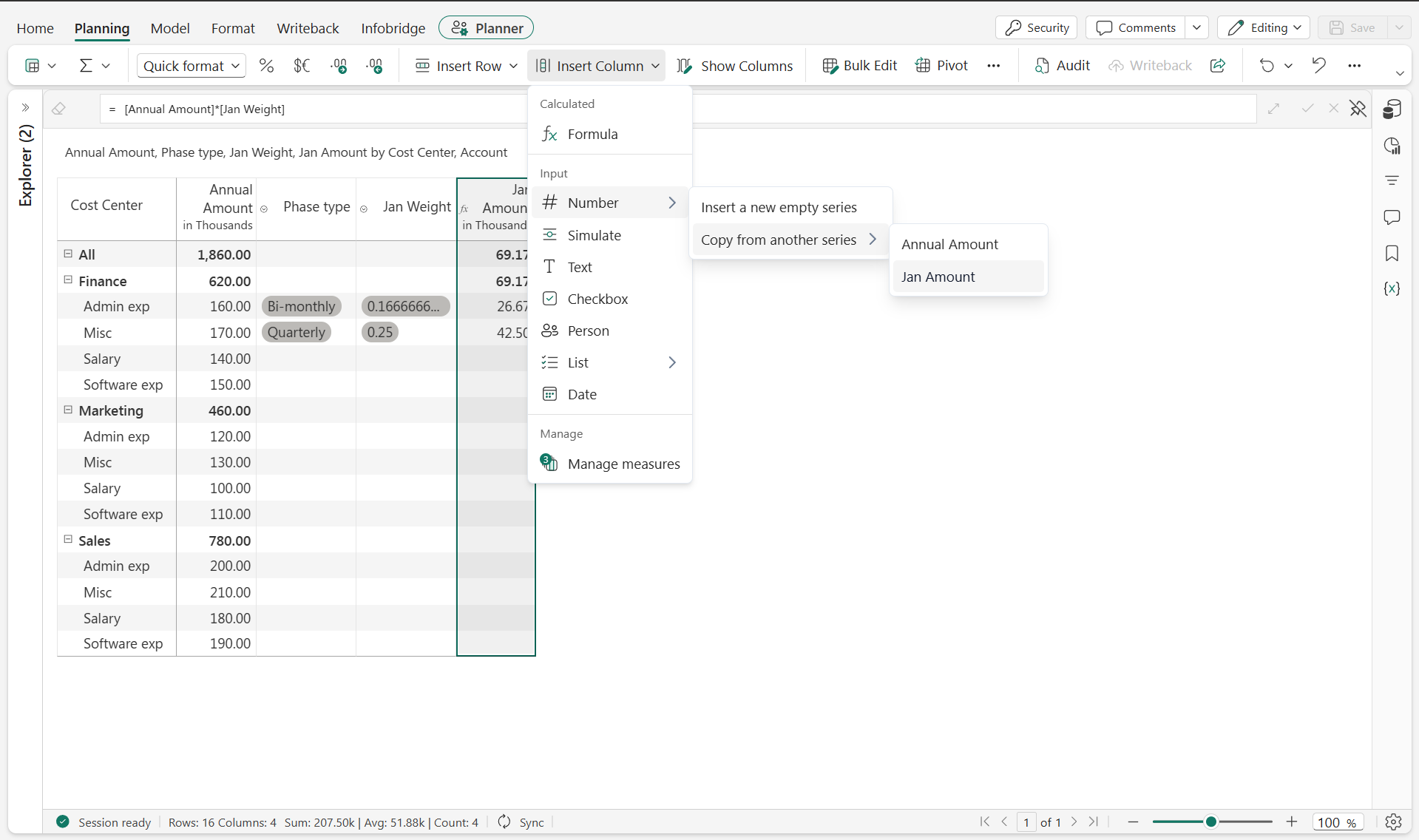
Additionally, the formula column's result can be copied into an editable input column using the Copy from Another Series option.

  1. Behaviour of editable input columns created using Copy from Another Series

When an editable input column is created using the Copy from Another Series option, it functions independently of its source column. 

For example, if an editable January Monthly Amount column is created by copying a formula column, any changes made to the editable column will not affect the original formula column, monthly weight columns, or Phase Type column. 

The same behaviour applies in the reverse direction. Changes made to the Phase Type or the source formula column will not automatically reflect in the copied editable input column. 

  1. Recalculation when the Phase Type changes

The Monthly Amount formula column will dynamically recalculate whenever the Phase Type selection changes, as the formula references the monthly weights. 

However, this recalculation is not expected to happen automatically in the editable Monthly Amount column created using Copy from Another Series, since it functions independently of its source column.
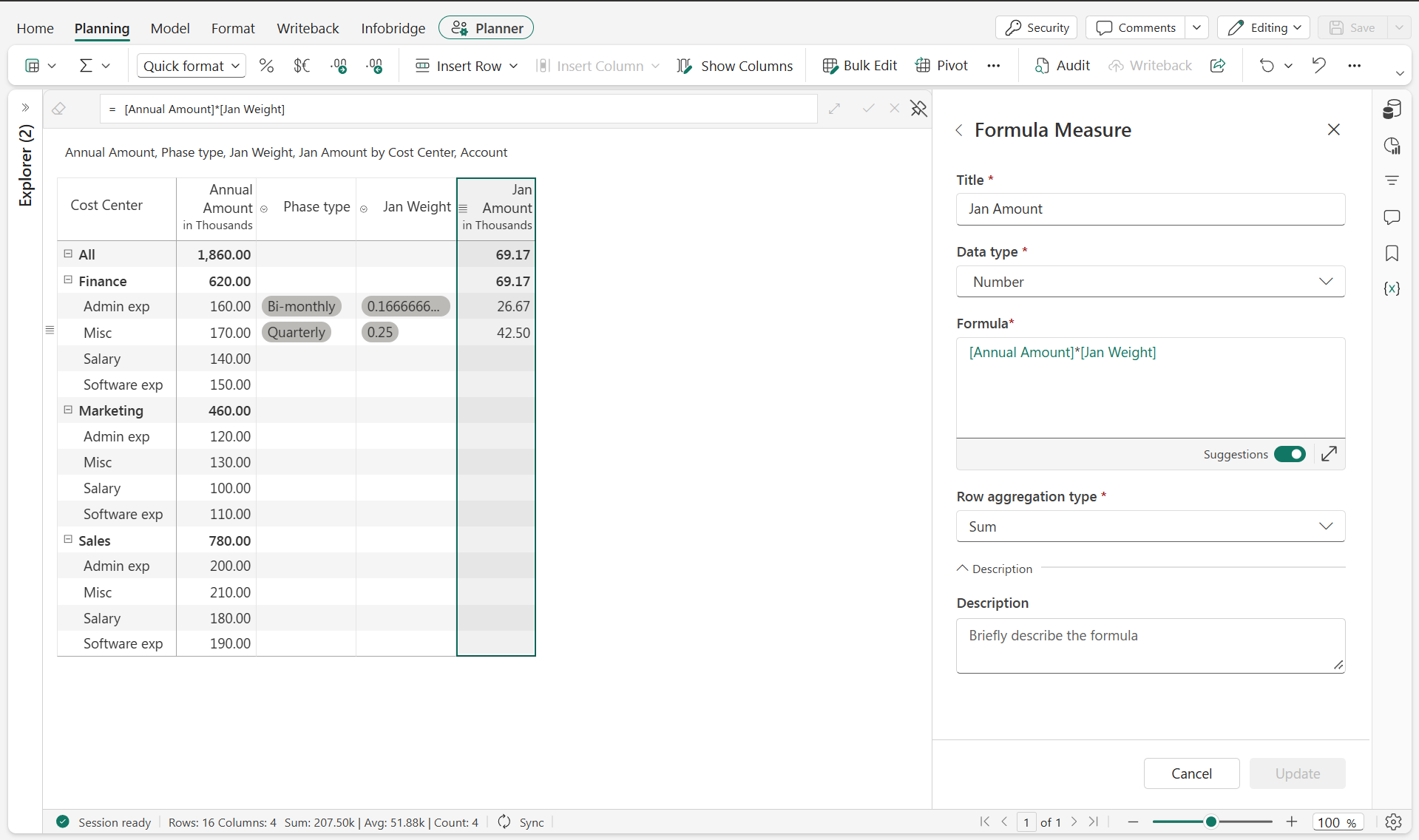
For example, in the above screenshot, Finance cost centre, the Misc account has an Annual Amount of 170. The Phase Type has been changed to Evenly, which results in January Weight of 0.08333. Applying this weight to the Jan Amount changes it to 14.17 in the formula-based column. 

However, the editable Monthly Amount column retains its previous value of 42.50, as it is independent of its source columns. 

  1. Reference table source

The reference values can be retrieved from the Semantic Model. Referencing values directly from a PowerTable is not supported for single select columns currently.

  1. Approach to the usecase

This particular approach, which uses Single Select columns and references the semantic model, requires 12 separate columns each for monthly weights amounts. 

However, an alternative approach using PowerTable may also be suitable for this use case and could support a long-form data structure.
 

      7.Feature release update 

This feature enhancement is currently undergoing testing and is expected to be available in the product soon. 


Viewing 5 replies - 1 through 5 (of 5 total)

Microsoft, Azure, Copilot, Excel, Fabric IQ, Microsoft Entra, Microsoft Fabric, Microsoft Teams, OneLake, Outlook, Power Automate, Power BI and SharePoint are trademarks of the Microsoft group of companies. IBCS is a registered trademark of IBCS Association. All other trademarks are the property of their respective owners.

This community is operated independently by Lumel. Nothing on this site constitutes a representation or warranty by Microsoft.