
Solved

Pasting values from excel into Input Fields and ignore all native measures

Started by Frans · 1 week, 4 days ago · 7 replies · 108 views
Frans Participant
1 week, 4 days ago

Hi,

It is very convenient to paste values from excel into (for example) a forecast input field inside a planning sheet.

Suppose we have a table with a Actual column (AC), Budget column (BU), Previous Year (PY) column and a Forecast input column (FC) in which planner can enter forecast values per year and month.AC, BU and PY are native measures and cannot be changed. And my forecast period starts as of Sep 2026:
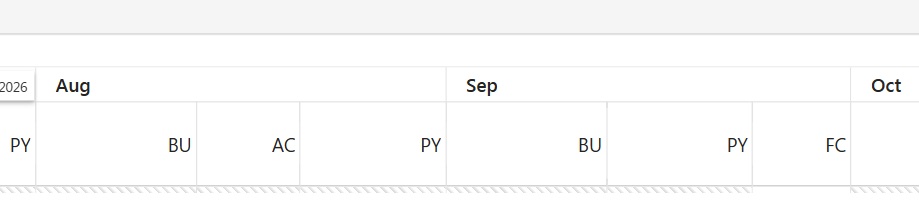
Now I want to copy my forecast values from excel into the FC column in a planning sheet, values are for example: 10.000, 20.000, 30.000, 40.000, 50.000, 60.000.

If I would paste it in Sep 2026 (see screenshot above), Sep FC would be 10k and Oct FC would be 50k instead if 20k. That is because it will not paste the 20k, 30k and 40k inside the native measures (it cannot do it). This is good because I only want to paste it inside the FC column, but it should skip the AC, BU and PY all together when pasting it since these are native measures.

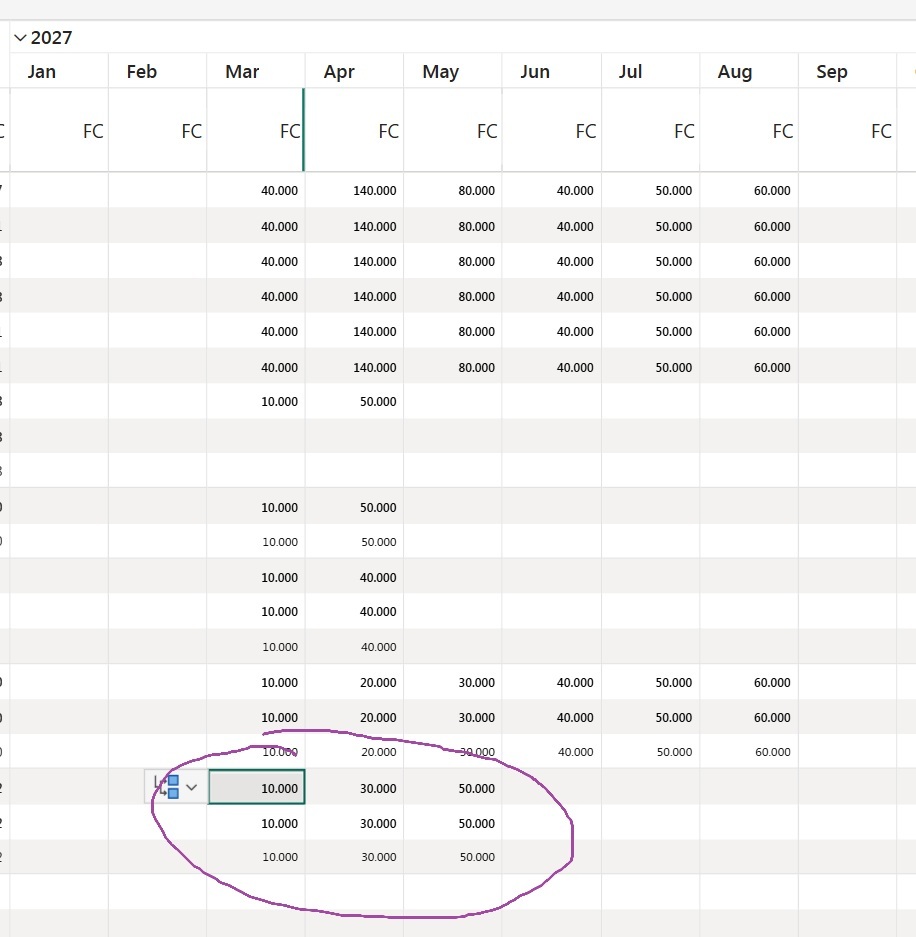
If I then hide BU and PY and try pasting it again. Sep FC would be 10k, Oct FC would be 30k etc since the AC column is still present in the background although you cannot see it inside the planning sheet for that particular year/month combination.

BU and PY hidden but AC not hidden and pasting the same values in march 2027 (see purple circle)
AC, BU and PY hidden and pasting the same values in march 2027 (see purple circle), But I need to show AC for the closed period:
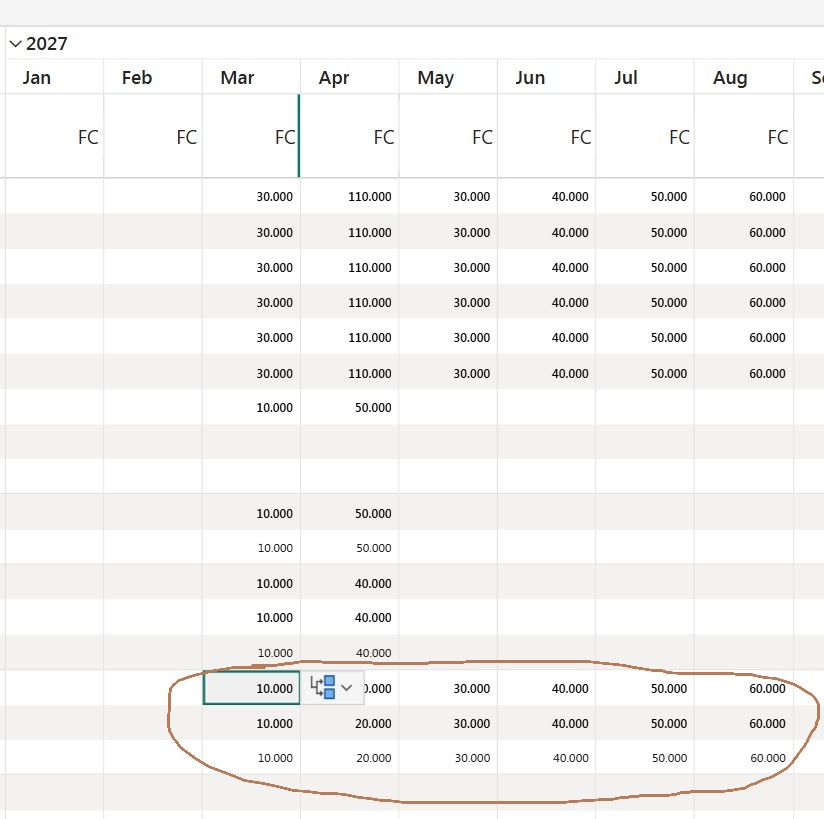
 

If I then hide AC, BU and PY and try pasting it again. it works as intended but I lose my actuals for the closed period.

My question is, how do I paste these values only inside my FC column while keeping the AC column visible for the closed period? (BU and PY may be hidden, I can calculate a total in a new column). It appears that it does not treat all native measure equally, maybe an idea is to only consider input fields and ignore native measures all together (visible or not) when someone pastes values inside a planning sheet.

Thanks in advance. If it's not clear let me know.


7 Replies

Data Engineer · Oetiker · 1 week, 4 days ago

I can't seem to edit my text: In my last screenshot I mean the brown circle not the purple one again 🙂

RavishangarLumel Staff
1 week, 4 days ago

Hi Frans

Thank you for reaching out.

We have received your post and will review it. We will get back to you shortly with the appropriate details.


RavishangarLumel Staff
1 week, 3 days ago

@Frikandel

Hi Frans,

Regarding the issue with pasting data from Excel, we were able to replicate the behavior. When copying and pasting data from Excel, the values skip the native measure columns and are pasted into the cells immediately following them. This is the expected behavior.

However, if you hide the native measure columns, the copied values will be pasted directly into their respective columns in the Forecast (FC).

In your query, you mentioned that you would lose your actuals for the closed periods. Could you please clarify what you mean by this?

For closed periods, you cannot insert or update forecast values because those periods are locked. You would need to reopen the closed periods to paste the values from Excel into the Forecast.

Could you help us understand, actual values you are concerned about losing in the closed periods?

Data Engineer · Oetiker · 1 week, 2 days ago

Hi Ravishangar,

Thanks for the reply. Let me try to clarify.

"Regarding the issue with pasting data from Excel, we were able to replicate the behavior. When copying and pasting data from Excel, the values skip the native measure columns and are pasted into the cells immediately following them. This is the expected behavior."

In my view the values 'dissapear' when you try to paste them over native measure columns. It would be nice if the values appear in the next input field instead of being skipped altogether.In my planning sheet I try to paste six values (10k, 20k, 30k, 40k, 50k, 60k) from excel inside a planning sheet.

Figure 1

I have two native measures (AC, BU) and one FC measure created inside the planning sheet itself. If I paste the six values from excel into the planning sheet into 2027 january, without hiding the native measures (AC, BU), it will not paste the 20k, 40k, 50k and 60k as the native columns are on those positions (the excel values 'dissapear'):

Figure 2

Since I cannot manipulate those native columns anyway I would prefer a different 'pasting' behaviour, namely:

Figure 3

I could of course, hide the native columns (AC, BU), then the pasting follows the excel structure. However that would mean you cannot visually compare AC, BU and FC anymore (in other words I lose my AC closed period columns since im hiding the entire AC column). Hence, this is not a proper solution.

Alternatively, I can change the excel format to match my planning sheet structure:

Then pasting the excel values inside my planning sheet will work as in figure 3. To be clear, i'm not trying to paste forecast values inside closed periods. The periods above are open.

In short: I do not wish to hide columns in order to paste values from excel into a planning sheet or change the excel format to match the planning sheet. It would be nice if native columns are always ignored when pasting excel values (hidden or not) as they cannot be manipulated anyway.

I hope this helps 🙂

RavishangarLumel Staff
1 week, 2 days ago
Thank you for the clarification. We will review this internally and get back to you.
Accepted answer
RavishangarLumel Staff
5 days ago
Best Answer

@frikandel

Hi Frans,

Regarding your requirement to copy forecast values from Excel and paste them into the plan, this is supported, but not when native measure columns are included in the target range. During the paste operation, the values will skip the native measure columns and be pasted into the columns that follow them.

To achieve the desired result, you can either hide the native measure columns before pasting or prepare the Excel file so that the native measure columns are left blank, allowing the values to align correctly with plan columns.

This behavior is similar to Excel itself, where a paste operation updates only the corresponding target cells and does not automatically skip columns and continue pasting into subsequent columns. Therefore, hiding the native columns or leaving them blank in the source file are the available approaches for this scenario

Data Engineer · Oetiker · 4 days, 10 hours ago

Thanks Ravishangar. I will hide the AC column after all, I can use the FC column for actual values (since FC is populated with AC values for closed periods).

Viewing 7 replies - 1 through 7 (of 7 total)

Microsoft, Azure, Copilot, Excel, Fabric IQ, Microsoft Entra, Microsoft Fabric, Microsoft Teams, OneLake, Outlook, Power Automate, Power BI and SharePoint are trademarks of the Microsoft group of companies. IBCS is a registered trademark of IBCS Association. All other trademarks are the property of their respective owners.

This community is operated independently by Lumel. Nothing on this site constitutes a representation or warranty by Microsoft.



