

Lumel
Introducing Driver-Based Planning in Microsoft Fabric Plan
Driver Based PlanningFabric Planning
The Native Planning Engine stores planning data and application metadata as files in OneLake. That one architectural shift, together with optimizations across the product, makes Fabric Plan faster from the first click to the final writeback.
This is Part 3 of our three-part Native Planning Engine series, covering the Fabric Plan performance improvements beyond calculation and writeback. Part 1 introduces the Native Planning Engine, and Part 2 covers writeback to OneLake.
Covered in Parts 1 and 2: 10× more scale (12M cells), 10× faster calculation and up to 13× faster writeback.
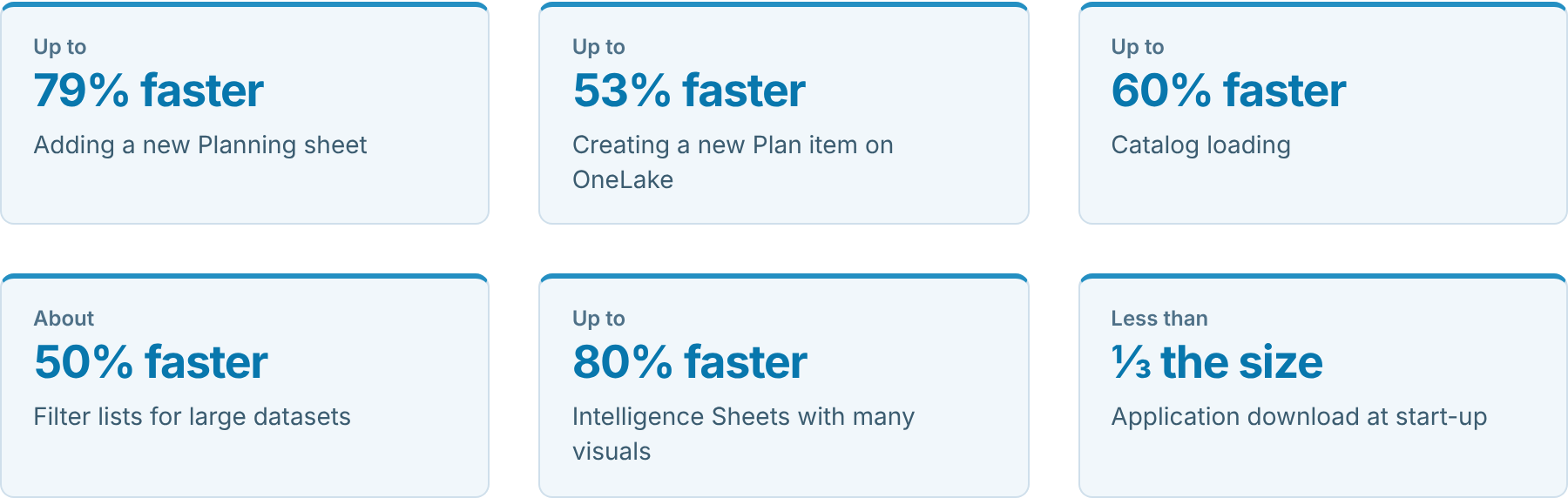
Figures come from our testing. Performance varies with workload, model design, data size and capacity.
With the Native Planning Engine, planning data and application metadata are stored as files in OneLake, and Plan items no longer need a separate system database. The benefits go well beyond the calculation and scale gains in Part 1 and the writeback gains in Part 2: creating and opening Plan items, adding Planning sheets and returning to views you use often are all faster too.
We also optimized start-up, the catalog, filters and Intelligence Sheets. Some of these improvements reach every Plan item; the full set comes with the Native Planning Engine and OneLake.
In this article:
The same everyday tasks, from launch to writeback, before and after the Native Planning Engine and OneLake.
| What you do | Before | After | Change |
|---|---|---|---|
| Launch Fabric Plan | A large application to download first | A compact package that loads quickly, even on slower networks | Less than ⅓ the size |
| Create a Plan item | Set-up took about twice as long | Ready for planning in about half the time | Up to 53% faster |
| Open a Plan item | Slower to open | Opens up to a third sooner | Up to 33% faster |
| Add a Planning sheet | Adding a sheet took up to five times as long | New sheets are ready in a fraction of the time | Up to 79% faster |
| Browse the catalog | The full catalog loaded up front | Each section loads as you open it | Up to 60% faster |
| Open a filter | Long member lists took time to appear | Lists appear with only the members you need | About 50% faster |
| Plan at scale | Up to 1.2 million cells in aggregate | Up to 12 million cells in aggregate (Part 1) | 10× more scale |
| Calculate the plan | Calculations on the previous planning engine | In-memory calculation on the Native Planning Engine (Part 1) | 10× faster |
| Load an Intelligence Sheet | Visuals competed for shared resources while loading | Visuals load side by side without waiting on each other | Up to 80% faster |
| Return to a view you use often | Data was fetched again each time | A fast local copy is used first | Faster repeat visits |
| Write back results | SQL-based writes | File-based Delta Parquet writes directly to OneLake (Part 2) | Up to 13× faster |
What it means for your team: less waiting during planning sessions, more scenarios tested before a deadline, and a tool that more people keep using.
Some of the result depends on how your environment is set up. These four steps make the biggest difference.
The file-based architecture is what unlocks the full set of improvements in this blog. Plan items still on the previous planning engine miss many of them.
Turn on Store new Plan items in OneLake at the tenant and workspace levels, start with new Plan items, then migrate your existing ones gradually. Part 1 walks through each step.
Saving planning results to OneLake makes everything above even more effective. Your plans, forecasts and assumptions sit in one governed place, and reporting across Fabric reads them directly.
File-based Delta Parquet writes to OneLake are about 5–6× faster than SQL-based writes at typical volumes and up to 13× faster at 12M cells. Fabric SQL remains a fully supported writeback destination. Part 2 shows how to set it up.
Fabric Plan reads data from your semantic model, and how long that takes depends on how well the model performs.
Outside Fabric Plan’s scope. The improvements in this blog cover what happens inside Fabric Plan. They do not change how quickly your semantic model loads. If you want data to arrive faster, work with your semantic model owner to keep the model well designed and efficient.
The more detail a planning sheet holds, the more work it has to do. Detail that nobody plans against makes the sheet slower without adding value.
For scaling techniques such as context filtering, dimension partitioning, cubes and PowerTable, see Key Considerations for Planning at Scale with Microsoft Fabric Plan.
Move your Plan items to the Native Planning Engine, write back to OneLake, and keep your data model and sheets lean. You get faster planning everywhere, from the first click to the final writeback.
Start with Part 1: turn on the Native Planning Engine, then Part 2: write back to OneLake.
Learn more in the Fabric Plan documentation and on Microsoft Learn.
For readers who want to know what changed behind the scenes at each step.
Improvements are described as “up to” or approximate figures, and results vary with workload, model design, data size and capacity.




Comments
0Please log in to comment.