Returns the single most frequently occurring value in a dataset. When multiple numbers appear frequently, it returns the first mode.
The MODESNGL function works similarly to the MODE function and returns the single most frequently occurring value in a dataset. When multiple values are repeated, it returns the first number that appears the most frequently.
MODESNGL(number1, [number2], ...)The MODESNGL function syntax has the following arguments:
MODESNGL(10, 20, 30, 20, 40)
// returns 20
MODESNGL(5, 8, 5, 10, 8, 5, 8)
// returns 5
If multiple values share the highest frequency, the function returns the first one encountered.
You can use the MODESNGL function to determine the most common value in a dataset when analyzing frequently occurring metrics such as sales, scores, or costs.
If no values are repeated, the MODESNGL function returns a #VALUE! error.
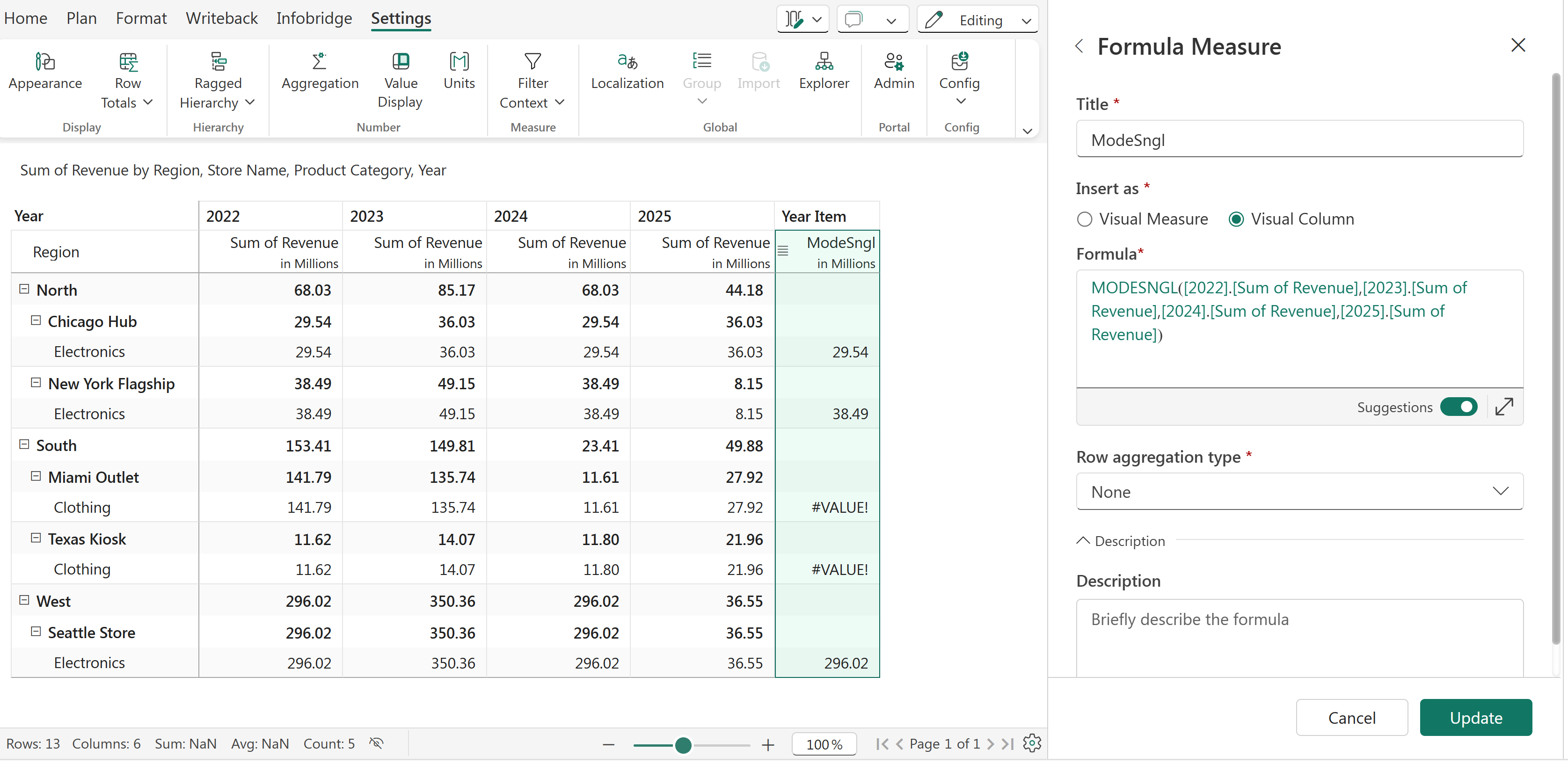
MODESNGL function
We can also use the SELECT function to select a range of columns from 1 to 4 for the 'Revenue' measure (2022 Revenue - 2025 Revenue).


